

T.F.SKYWINDINTL NEW 2000W ATX PSU Mining Power Supply PC Power Support 8 Display Cards GPU 95% Efficiency for BTC Bitcoin Miner


T.F.SKYWINDINTL NEW 2000W ATX PSU Mining Power Supply PC Power Support 8 Display Cards GPU 95% Efficiency for BTC Bitcoin Miner
SPECIFICATIONS
80 PLUS Certification: Other Certification
Application: Desktop,Server,Mining
Brand Name: T.F.SKYWINDINTL
CPU Power Connector: 8 pin
Certification: CE,FCC,RoHS
Conversion Efficiency: Max 95%
D-type Bus Number: 5
Frequency: 50-60Hz
Graphics Card 12V Pin Number: 2 x6 pin
High-concerned chemical: None
Input Voltage: 174V-264V
Input current: 10/5A
Interface Type: 20 + 4Pin
Model Number: TFATX688001
Modular: Non-Modular
Number of SATA Ports: 6
Origin: Mainland China
Output Voltage: see below
PFC Type: Active
Package: Yes
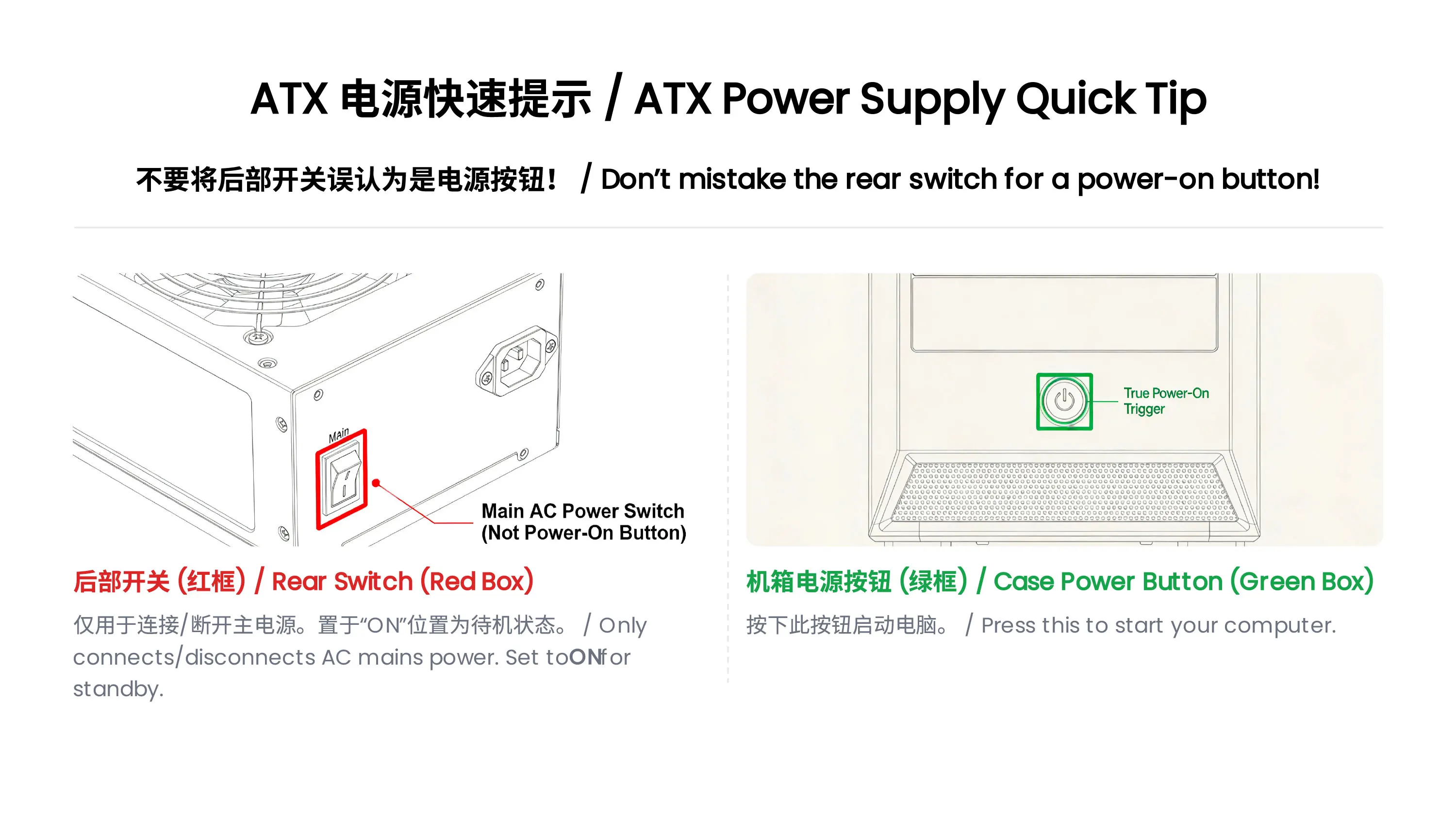
ATX Power Supply Rear Switch: What It Actually Does
Why can’t my ATX power supply start when I toggle the rear switch?
Many users mistakenly regard the rear switch of the ATX power supply as the power-on button. In fact, its function and the correct startup method are as follows:
Rear Switch Function: It only controls the connection/disconnection of AC mains power.
When set to ON: The power supply is connected to the mains and enters a low-power standby state, waiting for the startup signal from the motherboard.
When set to OFF: The power supply is completely disconnected from the mains, and no power is supplied to any component.
Correct Startup Steps:
Step 1: Flip the rear switch to ON and plug in the power cord.
Step 2: Press the power button on the computer case.
Step 3: The motherboard sends a startup signal to the power supply, which then starts to output power to all hardware (motherboard, CPU, etc.).
Warning: Frequent toggling of the rear switch may cause power surges and damage the power supply or motherboard.
ATX Power Supply DOA (Dead on Arrival) Troubleshooting Guide
What should I do if my ATX power supply is dead on arrival and not working at all?
If your ATX power supply is non-functional upon receipt, please follow these troubleshooting steps before contacting customer service:
Check the Rear Switch First
Confirm the rear AC switch is set to the ON position. The power supply cannot enter standby mode if the switch is OFF.
Verify Power Connection
Plug the power cord into a different wall outlet (avoid power strips with overload protection to rule out socket issues).
Ensure the 24-pin motherboard power connector and 4/8-pin CPU power connector are fully inserted and locked.
Check for Short Circuits
Make sure there are no loose screws or metal debris inside the case that could cause a short circuit (a short circuit may trigger the power supply’s protection mechanism and prevent it from starting).
Provide Detailed Fault Information
If the power supply still does not work, please record:
A video showing the rear switch position, power cord connection, and the result of pressing the case power button.
Photos of the power supply’s appearance and connector pins (to check for shipping damage).
Specifications:
1. Color: BLACK
2. Material:Steel shell
3. Fit for: Miner and other Server
4. Input Voltage: 160-240V
5. Current: 10/5A
6. Power: 2000w (MAX 2400w)
7. Mainboard: 24Pin
8. CPU: 4+4Pin
9. GPU: 6+2Pin * 16
10. IDE:2
11. SATA: 8 Port
12. Frequency: 50 / 60Hz
13. Input: + 3.3V 25A; + 5V 25A (150W)
14. + 12V 50A (1600W)
15. -12V 0.5A (150W)
16. + 5VSB 2.0A (100W)
17: stable with higheffectiveness
18. GPU: Support Up to 8 GPU(Not included)
Features:
- The smallest axis area, the largest fan area, with a special curved frame, to complete the best air circulation cooling system.
- Conversion rates up to 90% ,more energy efficient! More environmentally friendly!
- High reliability.
- Highly stable output voltage, better protects the product.
- This is a professional power supply for mining.
- The rated power is 2000w; and the maximum power is 2400w.
- Support 8 graphics cards
- Each power supply has to pass strict aging test before they go out.
- Suitable for minning machines and servers.


